
The quiet months take more work than the summer. These two Airbnb discounts help, and this is how they work, how they stack, and where to aim them.
Autumn and winter bring a different kind of guest. Couples after a few quiet nights, families around half-term, last-minute weekends booked on a whim from a phone on the sofa. The demand is there, and a good deal of it is browsing right now.
Airbnb has two discounts available that are built for exactly this. One targets the guests most likely to book and leave a good review. The other targets the place most people are booking from (their mobile!). Both take a couple of clicks to set up in SuperControl.
Here is what they do, how they work together, and how to get the most out of them.
The top-rated guests discount
Aimed at the guests most likely to book, and most likely to leave a good review.
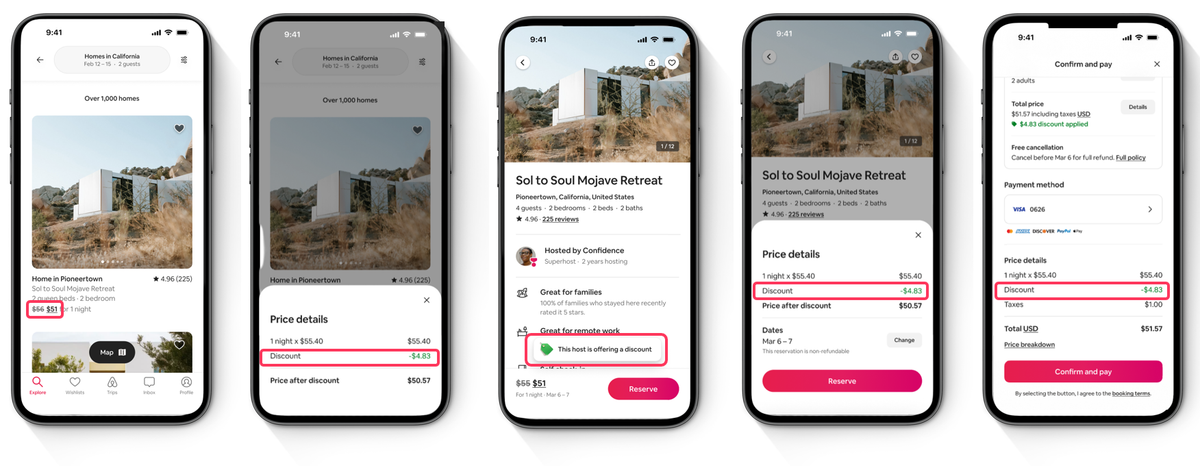
You offer 15% off to guests rated 4.8 or above with at least three reviews. Only those guests see the discounted price. Everyone else sees your normal rate.
You are not lowering your price to the whole market. You are lowering it for guests with a track record of leaving places as they found them, and who are more likely to leave you a five-star rating afterwards.
Airbnb’s own figures from a recent pilot put the effect at around 11%* more gross booking value, 14%* more nights booked, and a 43%* higher chance of securing a booking from a top-rated guest. These are modelled estimates and will vary by property and market, but the direction is clear.
What it does to your listing:
- Discounted pricing can improve where you appear in search results
- A badge appears on your listing page showing you are offering a discount
- Your original price shows with a line through it, so the saving is visible
The mobile-only discount
This one is about where people are booking rather than who they are.
Airbnb reported that over 60%* of browsing globally happened in their app in 2025, and around 65%* of bookings were made there. That has continued into 2026, with the app accounting for 63%* of total nights booked, up from 58%* the year before.
The mobile-only discount shows a 10% discount to guests browsing in the app. It is a straightforward way to put your best price exactly where the demand already is, while desktop bookers continue to see your standard rate.
How they stack
Stacking means more than one discount applying to the same booking. Instead of receiving a single discount, the guest may receive multiple discounts that are applied sequentially, resulting in a greater overall reduction.
Both of these new discounts stack. So if a top-rated guest books on the app, they get 15% off as a top-rated guest, and then the mobile discount comes off on top of that.
They also stack with the promotions you may already have running, such as early bird, last minute, new listing and custom promotions. Only one of those applies at a time, chosen by Airbnb’s priority order, but the top-rated guests and mobile-only discounts sit on top of whichever one it is.
The result is that the guests most worth having, browsing where most people browse, see a price that is hard to resist. Your standard rate never moves for anyone else.
Before you switch anything on, take your base rate, apply everything you have running, and look at the number at the bottom. Knowing your floor means you can stack with confidence.
Getting the most out of Airbnb discounts
Airbnb discounts can be a useful way to encourage bookings at different points in the booking journey. The key is understanding how each discount works and choosing settings that suit your pricing strategy.
- Make the discounts work for your property. Mobile and Top-Rated Guest discounts give you new ways to reach specific Airbnb guests, while Early Bird and Late Availability can help encourage bookings further ahead or closer to arrival. Choose the approach that best supports your wider booking strategy.
- Give the listing a look while you are there. A discount brings people to your page. Photos that suit the season are what convert them once they arrive. Swapping summer shots for a lit log burner takes ten minutes and works alongside anything else you do.
- Review the results. Keep an eye on the bookings coming through, how far in advance guests are booking and the rates achieved. Over time, this can help you understand which discount settings work best for your property.
Not on Airbnb?
In peak season, the bookings tend to find you. Repeat guests, direct bookings, word of mouth.
October to March is where that changes. The people who would have found you have already booked, and what is left is demand you might not reach from where you are standing.
The maths changes in the off season too. Commission on a peak week is a cost you might reasonably question. Commission on a midweek night in November that was heading for nothing is coming out of revenue you would not otherwise have had, and a guest who finds you that way may well book with you directly next time.
Airbnb’s crowd is big, books late, and books from a phone on the sofa. Which is more or less exactly who is looking in the quieter months.
If you are not listing on Airbnb, these two discounts are as good a reason as any to have another look, particularly for the nights that are hardest to fill.
In summary
Airbnb’s discounts give you different ways to encourage bookings depending on what works best for your property. You might want to encourage guests to book further ahead, attract last-minute demand, reach guests booking on mobile, or appeal to highly rated guests.
Early Bird and Late Availability work around the guest’s booking window rather than specific stay dates, while Mobile and Top-Rated Guest discounts help you reach particular types of guests. Together, they give you more choice over how you use promotions as part of your wider pricing and occupancy strategy.
*Figures cited are Airbnb’s own, based on a pilot running February to March 2026 and modelled estimates observed June to July 2026. Results vary by listing and market.

